
Why Internal Linking is a Fundamental of SEO (And How to Do it)
I sometimes use affiliate links in content. This doesn’t cost you anything but I may make a commission payment from anything you buy through these links. As an Amazon Associate I earn from qualifying purchases. All opinions remain my own.
If keywords are the signposts that tell search engines what your content is about, internal linking is the footpaths that users and search engine bots use to travel around your website. It might not seem like an important step but organising your internal linking structure is one of the fundamentals of SEO. Yet it is a different thing altogether than external linking or link building.
So, what is internal linking and how do you do it?
Table of Contents
What is internal linking?
Let’s start with an introduction to internal linking and hands up if you realise you are already doing this? We will use this very article as an example.
An internal link is a way to connect together the pages of your website. Good website structure will mean each post is part of a category, sometimes a subcategory. But that doesn’t always show when you are in a post. That means you could be reading this article and not know that I have written another complementary article on link building or external links (but now you do, because the different colour of those words indicates an internal link to that article).
So if you wanted to read more on that side of the topic, you would just click the link and off you would travel. Great for you because you have more information on the topic and great for me because you are staying longer on my site and finding it more useful. Lastly, great for those search engine bots too.
Why? Because little crawlers use internal links to find their way around your content. So the more relevant internal links you can create the more they will travel around your site, cataloguing away and indexing your content.

Difference between internal and external linking
One puzzling thing about links is that you can’t always tell the difference between internal and external by looking at the link. But in terms of SEO, there is a big difference.
External links take you away from the site. Now that might seem a bad thing, but it isn’t, when done right. The aim of external links is to connect you to quality, authority content that backs up what you are discussing in your post. In this case, an external link to this article by Neil Patel is a great way to read a serious SEO fan’s longer take on the topic (that coloured bit is an external link, by the way).
Internal links only connect to other parts of your website. So that piece on external linking I mentioned or another on mastering on-page SEO could also be relevant when reading this piece. That’s why you would link to them in this article.
Internal linking structure
There is a lot of complex stuff about internal linking structures and how to make your internal links worth more. But for starters, it is important to concentrate on how many internal links per page, knowing what to link to and help users (and bots) find their way more around your site.
Link to cornerstone articles
One tip from Yoast is to try and link every article to your cornerstone pieces. These are the big, important pieces of content you have created that are the cornerstone of that particular category. Of course, this assumes you have them – it’s a relatively new concept that features on the Yoast plugin that not everyone will have got around to yet (me included).
Link to old articles and to new ones
Linking forward and backwards in time is important. When you write a new post, you will automatically start linking back to older posts that are relevant, as I have done here. But what you should also do is periodically go to older posts and link forward.
So I could go to the link building and SEO articles and link them to this one. They are all relevant to one another, it helps the reader grasp the topic and those crawlers will check out all of the posts easily.
There’s no right and wrong answer as to how many links per page you should have. Some say aim for four or five per article. If you don’t have loads of content, aim for one or two as well as your external links. The important thing is to start linking and going over old posts to update those links rather than trying to get a specific number in.
Related posts plugins
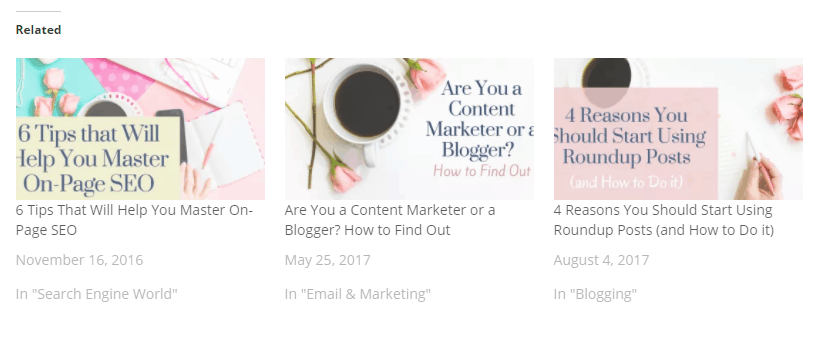
Another good tip for internal linking is to use a plugin to automatically link to other related posts at the bottom of the piece. Jetpack does this and there are a number of other plugins I plan to explore for this to give me a little more control over what shows. But if you have Jetpack installed, then it is a good starting point. It will include three posts at the bottom with the option for an image, categories and other info so that when people reach the bottom, there’s more to read. And it is good for internal linking SEO purposes too.
Anchor texts
The final thing to discuss about internal linking is what is known as anchor texts – the bit you highlight to attach that link to. Try to use a long tail keyword or at least a word or two that are relevant to the content you are linking to. I wouldn’t link the link building article to an anchor text that said ‘search engine bots’ because that’s not really what it is about.
With anchor text, try to avoid using an exact match between the topic and the anchor – so don’t use the full post title for that other blog post. Also, avoid phrases like ‘click here’ or ‘read more’ because they don’t have any SEO value and the search engine bots don’t understand the link then so it’s worth less. And finally, don’t link more than one sentence as this just looks weird.
Finally, don’t worry about the whole no-follow business with internal links. You do want bots to follow the links and there’s no problems with them so don’t include that ‘no follow’ tag on them. Save that for sponsored posts and that kind of thing.
How to manage links easily
Now linking is super important and also quite a lot of work. Here’s my secret – I cheat a bit! Well, I don’t cheat but I use a plugin that helps. It’s called Link Whisper and it is the quickest way to get those links and to spot articles without internal links.
Link Whisper is a paid plugin but is definitely worth the investment. It creates a section at the bottom of every post with suggested links and highlighted anchor text. Now you don’t have to choose them, you need to use your content knowledge to know what’s best to link. But if it is a good match, a simple click and it will insert the link for you.
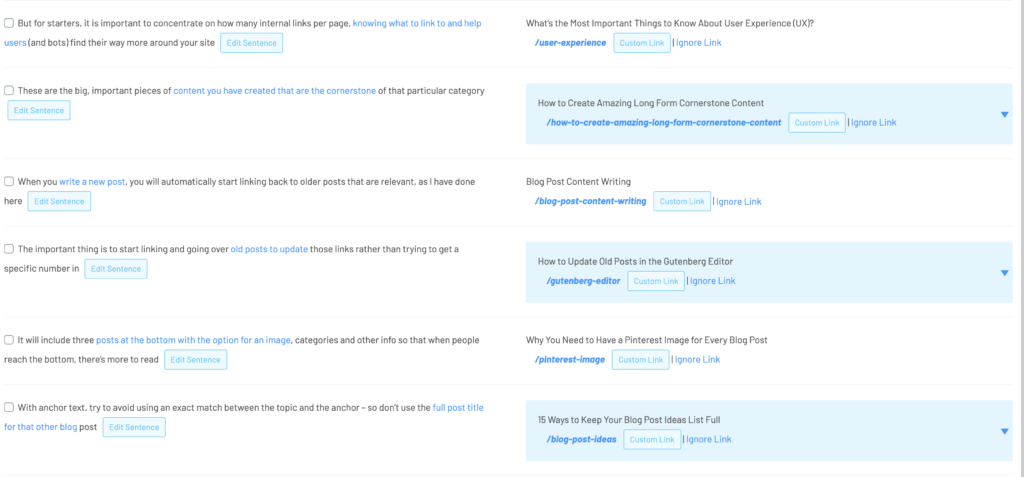
Not only that but there are loads of other features. Top of the list is the ability to find posts with no links – orphaned posts. Usually these are older posts when there wasn’t much to link to. Or maybe you just forgot. But it can spot them and help you add those crucial links so the post isn’t left all by itself.
Conclusion
Internal linking is a fundamental of SEO and one you need to do now. If you have links but haven’t updated them for a while, then schedule a linking session into your calendar. And get in the habit of linking where relevant in everything you write – your readers will thank you for it and so will your SEO.
I’ve been overhauling the links on one of my older blogs and after a few weeks work, I noticed my weekly page views had doubled – I think the links had a lot to do with it. Have you got any linking success stories? Or any problems with it? Hit the comments below!