6 Steps to Start Using Facebook Messenger for Business
I sometimes use affiliate links in content. This doesn’t cost you anything but I may make a commission payment from anything you buy through these links. As an Amazon Associate I earn from qualifying purchases. All opinions remain my own.
If there’s one feature of Facebook that has grown hugely in terms of how much we use it, it is Messenger. That little blue lightning bolt (or whatever it is) has become the default way to talk to many people in our lives. Personally, I know there’s rarely a day when I don’t get a message or 10 come through from friends, family, my husband…
But what about using Facebook Messenger for Business? Is that even a thing? And would customers want to chat with us the same way as we chat with our mates?
Table of Contents
What is Messenger again?
Just in case you have managed to avoid Messenger so far, a quick introduction never hurts. Messenger is a separate app to Facebook, but you can use your Facebook account to access it or alternatively set it up with a telephone number. It offers a number of features:
- Instant messaging between two people
- Photo and video sharing
- Group chats between a number of people
- Record voice messages
- Live video chat or video calling
Unlike things posted on Facebook, only you and other members of the chat can see what is said. So if you want a private conversation with your friend, this is the way to do it rather than posting for potentially anyone to see on your main wall.
You Might Also Like Facebook Group Invites – Everything You Need to Know (Updated for New Facebook) by Skylark Virtual Services.
Can Facebook Messenger be used for business?
According to Social Media Examiner, there are 800 million people using Facebook Messenger each month. Because you only need a phone number and not a Facebook account to use it, even those few people who don’t use FB can make use of it.
In terms of using Facebook Messenger for business, the original use was that you could set it up for your Facebook Page and visitors could send you a message. Then you could reply. Now, page owners can respond to anyone who has commented on the page, either privately or publicly – they just can’t initiate conversation with users or access any email address information.
With the average user checking Facebook 14 times a day and almost 90% of us have the app on our phones, Messenger can be a great way to connect with people on a platform they are used to using for conversations. It is a great way to personalise your brand and build relationships.
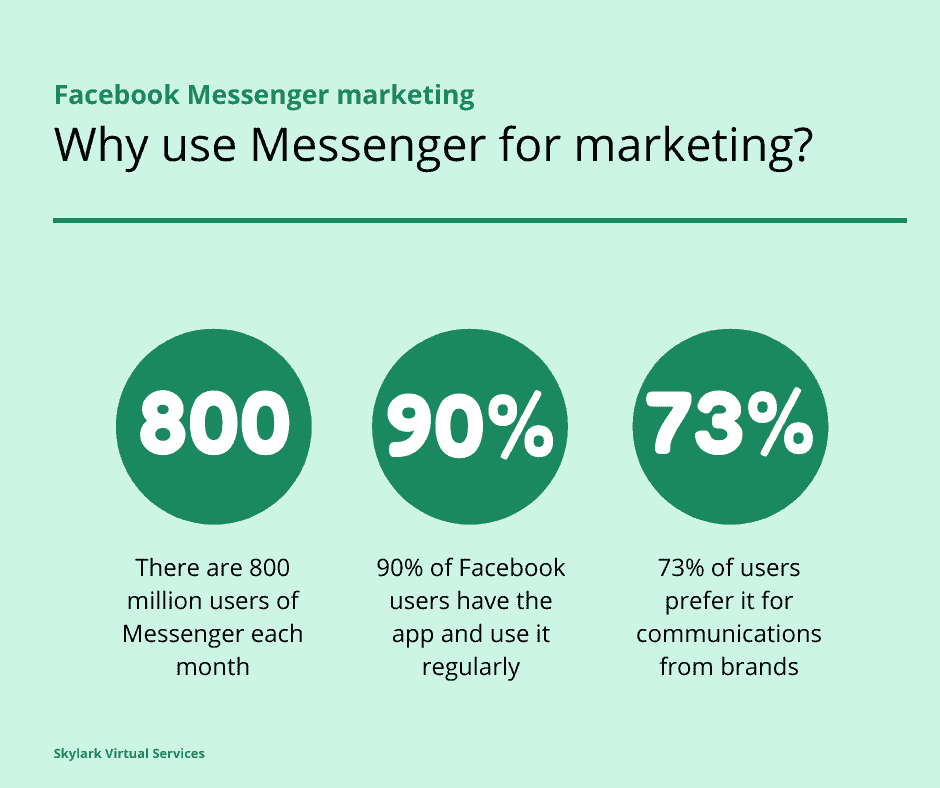
The other reason to consider using Messenger for business relates to the fact that we are all seeing too many ads and have almost become immune to them. Businesses who use Messenger have found 15 times more engagement versus standard Facebook ads. And when customers are asked, 73% of them say it is more appealing than using the phone (44%) and email (61%) to solve customer enquiries.
What kind of private messages could you send?
So there’s a firm foundation for using Messenger for your business but the question that comes to mind for me is simple – what kind of messages should I send? Let’s take a look at some ideas.
Answer questions about products or services
This makes perfect sense to me and I’ve actually done it either through my page or my own profile. People want to know a bit more about what you do so they message you on Messenger and you chat. Sometimes this evolves into a video call or an email exchange. But I have a number of people who have bought my services entirely based on Messenger chat.
Real-time customer support
While offering Facebook Messenger customer service doesn’t mean you need to be available 24/7, being able to offer real-time customer support during your ‘working’ hours is something that will appeal to customers. You can also send order confirmations, shipping info or even tell them about a related product based on their purchases.
Deal with complaints
Another thing that needs to be dealt with quickly is complaints and Messenger can be great for this. People can get a quick response, you have a record of the conversation and you can often handle the problem there and then, giving a good customer experience.
6 steps to start using Messenger for business
Convinced it is worth a go? Okay then let’s move to the technical stuff, the actual how of using Messenger for your business. And it is pretty simple, you will be pleased to hear.
Step 1 – enable messages on your page
The first question is ‘how do I get Messenger on my Facebook Page’ and the answer is very easy! To do this, go the General Settings > Messages then Edit. Select the option that allows messages to your page and clicks save. You can also use settings such as Away for when you are offline and also appoint moderators to help out if you have other people working in the business.

Step 2 – configure settings for messages
There are two main settings to fiddle with – response time and instant replies. Both are under Settings > Messaging. Display a response time shows people how long it takes you on average to reply to a message and shows in the ‘About’ box on the side of the page.
You can toggle between this setting which is calculated by Facebook or one of the other settings such as ‘typically replies within an hour’ or a day. You can also toggle Away on at any time, so response time isn’t affected.
The other option is to set up an instant reply. This can be up to 250 characters long and will be sent to all messages unless you have the Away setting on. So you can direct people to your email address if it is urgently, tells them your working hours or simply acknowledge their message.

Step 3 – create saved replies
Hands up if you are a fan of saving stuff so you don’t have to type it every time? Yup, me too. And with Messenger, you can set up a few default answers that will appear when someone sends a message. There are two default replies then you can edit to add more, add images or other information.
Step 4 – learn about message senders
Because Facebook knows all, you can easily see a bit about the person messaging you before you reply to them. They display a link to the profile, if they liked your page, any previous communication and a little info about the person such as location and where they are from. That way you can spot those return messengers and acknowledge them or other personalisation tactics.
Step 5 – keywords and notes
To help keep track of your Messenger conversations, you can add keywords and notes to them that you can see. There are a couple of default options and you can add your own along with notes about the conversation. This is a big benefit of Facebook Messenger for business, especially if you have more than one person in the business, so everyone knows what is going on.
Step 6 – add Messenger to your website
The final step is to add Messenger to your website so people can send you a message. Facebook’s new Page Plugin lets you easily do this along with including information from the Page’s timeline, upcoming events and that important message box.

Chatbots
Love them or hate them, chatbots are a huge part of marketing and look set to continue to grow in popularity. Sometimes they are good enough that you don’t realise at first you are even using one. And Messenger is a prime place to use them to help your customers. With abilities such as smart replies and auto responses, you can ensure customers get an answer even when you are fast asleep.
Of course, the idea of chatbots is to use them to handle routine, basic enquiries, not to take the place of people. So a good balance of chatbots and you still remain the best way to use Messenger for business.
Facebook Messenger mistakes
While there are some great ways to use Facebook Messenger in marketing, there are also some mistakes to avoid and some etiquette issues to watch for.
Not having an automatic greeting or response
If someone messages you in the middle of the night, you don’t want to leave them hanging. While bots are a fantastic way to handle this, even something as an automatic greeting or response will act as an acknowledgement.
Say thanks, tell them when you will respond and use personalisation features to automatically have their name added.
Being slow to reply or not replying at all
While you don’t need to be glued to Messenger to use it for marketing, you do want to check regularly or have a system to make sure you reply to messages in a timely manner.
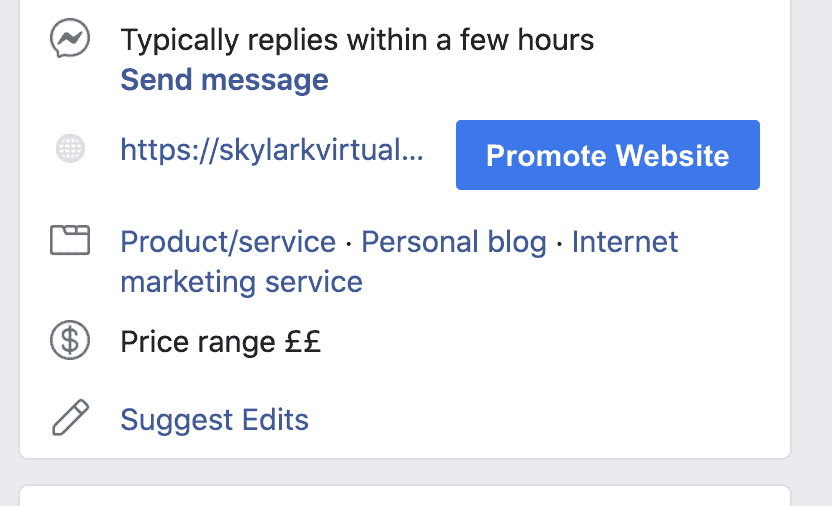
And there’s a prominent reason for this – it shows on your Facebook profile. It you have a response rate of over 90% and a response time under 15 minutes, you can get a ‘very responsive’ badge for your profile.
Mine says ‘typically replies within a few hours’ at the moment – it’s a time difference thing being in the UK!
Messaging too much
Facebook changed its 24 hour response policy in March 2020, so businesses have 24 hours to send a message either by human or by bot in response to certain actions. And these require no additional responses after. Examples include:
- Sending a message to a page
- Clicking a call to action button in a conversation
- Clicking an ad and starting a conversation
- Using a plugin to start a conversation
- Reacting to a message
But regardless, it is worth being careful about the number of responses – too many and you can irritate the receiver. Use features such as streamlined message tags to help with things like order updates.
Sending huge paragraph messages or lots of mistakes
We’ve all had those mega messages from friends who tell an entire story in a single paragraph or even sentence! Don’t be that person. Either break up the message, cut it right back or send a series of messages. If the conversation is a bit longer, suggest moving to live chat, phone or email.
And don’t forget to proof read your messages – nothing says poor etiquette like poorly checked messages.
A logical addition
Using Facebook Messenger for business is a logical addition to other ways to have contact with clients. We already ask for emails, chat via Twitter or exchange messages on other apps like WhatsApp so there’s no reason not to offer the feature of Messenger as well – probably the most well known of the lot.
Have you ever messaged a business via Messenger? Or had an enquiry from a customer? Tell us about your experiences in the comments!