YouTube SEO for Business: Complete 2025 Beginner’s Guide
I sometimes use affiliate links in content. This doesn’t cost you anything but I may make a commission payment from anything you buy through these links. As an Amazon Associate I earn from qualifying purchases. All opinions remain my own.
YouTube isn’t just a video platform—it’s the world’s second-largest search engine, processing over 3 billion searches per month. For businesses in 2025, mastering YouTube SEO has become essential for reaching new audiences, building authority, and driving conversions.
The good news? The YouTube algorithm has evolved to give small channels unprecedented opportunities. With AI-driven personalization and improved content discovery, your videos can reach the right viewers faster than ever before—if you know how to optimize them.
This comprehensive guide will walk you through everything you need to know about YouTube SEO, from channel setup to advanced optimization strategies. Whether you’re just starting out or looking to improve your existing channel’s performance, you’ll find actionable steps to help your business succeed on YouTube in 2025.
Table of Contents
Why YouTube SEO Matters for Business in 2025
YouTube’s reach is staggering. With over 2.7 billion monthly active users, it offers businesses an unparalleled opportunity to connect with potential customers. But here’s what makes YouTube particularly powerful in 2025:
The AI Revolution Has Leveled the Playing Field
Unlike years past when only established channels gained traction, YouTube’s AI-driven algorithm now prioritizes content quality and viewer satisfaction over channel size. This means a brand-new business channel can compete effectively if the content resonates with viewers.
Video Content Dominates Search Results
Google increasingly features YouTube videos in search results, especially for how-to queries and product research. By optimizing your YouTube content, you’re effectively improving your visibility across two major search engines simultaneously.
Higher Conversion Rates Than Other Platforms
Video content generates 66% more qualified leads per year than other content types. YouTube viewers are highly engaged, often spending 10+ minutes watching content—far longer than typical social media engagement times.
Long-Term Evergreen Traffic
Unlike social media posts that disappear within days, properly optimized YouTube videos continue attracting views for months or even years. This makes YouTube an incredible investment for businesses building long-term visibility.
Setting Up Your Business Channel for SEO Success
Your channel is your YouTube home base. Setting it up correctly from the start establishes a strong foundation for all your optimization efforts.
Creating a Business-Optimized Channel
When creating your channel, choose a name that’s:
- Memorable and brandable rather than keyword-stuffed
- Consistent with your other business profiles for brand recognition
- Available as a handle (YouTube’s @username format)
Your channel handle (@yourbusiness) appears in URLs, comments, and mentions, so choose wisely. It should be easy to spell and communicate verbally.
Optimizing Your Channel Metadata
About Section
Your channel description is prime SEO real estate. In the first 100-150 characters, include:
- What your channel offers
- Who it serves
- Your primary keyword naturally incorporated
Example: “Digital marketing strategies for small business owners. Weekly tutorials on SEO, content marketing, and social media growth.”
Then expand with more details about your business, posting schedule, and value proposition. Include relevant keywords naturally throughout, but prioritize readability.
Channel Keywords
Navigate to your channel’s advanced settings to add channel keywords. These help YouTube understand your content’s overall theme. Include:
- Your primary business category
- Main topics you cover
- Industry-specific terms
- Related services or products
Links and Contact Information
Add your website, social media profiles, and business email. These build credibility and make it easy for viewers to connect with your business beyond YouTube.
Branding Consistency
Upload a high-quality profile picture (ideally your logo) at 800×800 pixels and a channel banner at 2560×1440 pixels. Your banner should communicate your channel’s purpose and include a clear call-to-action.
Pro tip: Create branded video intros and outros that reinforce your identity across all content, making your channel instantly recognizable.
YouTube Keyword Research Mastery
Keyword research is the foundation of YouTube SEO. Unlike guessing what your audience wants, proper research reveals exactly what they’re searching for.
Why Keyword Research Comes First
YouTube SEO starts with understanding search intent. You need to know:
- What questions your target audience asks
- How they phrase their searches
- Which terms have search volume vs. competition
This intelligence guides your entire content strategy, ensuring you create videos people actually want to watch.
Using YouTube’s Search Suggest
YouTube’s autocomplete feature is a goldmine for keyword ideas. Here’s how to use it:
- Start typing a broad topic in YouTube’s search bar
- Note the suggestions that appear—these are real searches people perform
- Add letters after your keyword (a, b, c, etc.) to reveal more suggestions
- Try question words like “how to,” “why does,” “what is”
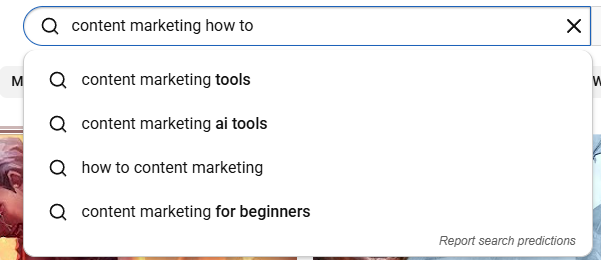
For example, typing “content marketing how to” reveals specific subtopics your audience searches for, each representing potential video opportunities.
Analyzing Successful Videos
Look at top-performing videos in your niche:
- What keywords appear in their titles?
- How are their descriptions structured?
- What tags are they likely using? (Use browser extensions like TubeBuddy or VidIQ to see competitors’ tags)
- What questions do viewers ask in comments?
This competitive research reveals gaps you can fill and successful approaches you can adapt.
Long-Tail Keywords for Easier Ranking
For new channels, targeting long-tail keywords (3-5+ word phrases) is crucial. They typically have:
- Lower competition
- Higher conversion intent
- More specific audience targeting
Instead of targeting “SEO” (impossible to rank for), target “SEO tips for small business blogs in 2025” (much more achievable).
Learn more about optimizing for long-tail keywords in our detailed guide.
External Keyword Research Tools
While YouTube’s native tools are powerful, these external resources add depth:
Google Keyword Planner: Shows search volume data and related terms across Google (which owns YouTube), helping identify trending topics.
AnswerThePublic: Visualizes questions people ask about your topic, perfect for creating Q&A-style videos.
Google Trends: Reveals seasonal trends and rising topics, helping you time your content strategically.
Documenting Your Keyword Strategy
Create a spreadsheet tracking:
- Target keywords
- Search volume estimates
- Competition level
- Related terms
- Video ideas for each keyword
This becomes your content roadmap, ensuring you’re always creating videos with clear SEO potential.
YouTube Algorithm Ranking Factors
What Matters Most in 2025
Audience Retention
- Average view duration
- Retention graph performance
- Rewatch rates
Click-Through Rate (CTR)
- Thumbnail effectiveness
- Title appeal and relevance
- Impressions to views ratio
Engagement Signals
- Likes and comments
- Shares and saves
- Subscription conversions
Session Watch Time
- End screen effectiveness
- Playlist performance
- Suggested video placement
Optimizing Video Metadata
Once you’ve identified your keywords, it’s time to optimize your video’s metadata—the information YouTube uses to understand and rank your content.
Crafting Compelling Video Titles
Your title is the most important ranking factor. It needs to balance SEO with click-worthiness.
Title Formula for Success:
- Lead with the primary keyword in the first 60 characters
- Add emotional triggers (numbers, power words, curiosity gaps)
- Include your brand name if you have space (end of title)
- Keep it under 60-70 characters to avoid truncation in search results
Examples:
- “YouTube SEO Tutorial 2025: Rank #1 for Your Business (Beginner Guide)”
- “7 Content Marketing Mistakes Killing Your Traffic (And How to Fix Them)”
- “How to Create a Facebook Group: Complete Step-by-Step Guide”
Notice how each title:
- States the benefit clearly
- Includes the target keyword naturally
- Creates curiosity or urgency
- Specifies the audience or outcome
For more guidance on creating effective titles, check out our guide to attention-grabbing headlines.
Writing Detailed Video Descriptions
YouTube reads the first 200 characters of your description most heavily. Structure yours like this:
First 1-2 Sentences (0-200 characters):
- Summarize the video’s value
- Include your primary keyword
- Add a clear call-to-action
Body of Description (200-5000 characters):
- Expand on video content with timestamps
- Include 2-3 secondary keywords naturally
- Add relevant links (your website, related videos, resources)
- Include social media links and contact information
Example Structure:
Learn YouTube SEO strategies that work in 2025. This beginner's guide covers keyword research, optimization, and algorithm changes to help your business videos rank higher.

🎯 What You'll Learn:
0:00 - Introduction to YouTube SEO
2:15 - Keyword Research Methods
5:30 - Optimizing Video Titles
8:45 - Description Best Practices
12:00 - Thumbnail Strategies

📌 Resources Mentioned:
[Link to your website]
[Link to related video]
[Link to free downloadable checklist]

👉 Subscribe for weekly digital marketing tutorials: [channel link]

#YouTubeSEO #VideoMarketing #BusinessGrowth
Strategic Tagging Practices
Tags help YouTube understand your video’s context. While less important than titles and descriptions, they still matter for discovery.
Tagging Strategy:
- First tag: Exact target keyword
- Next 3-5 tags: Keyword variations and related terms
- Final tags: Broader category terms
Example for “YouTube SEO Tutorial”:
- youtube seo tutorial
- youtube seo for beginners
- how to rank youtube videos
- youtube optimization
- video seo tips
- youtube marketing
- digital marketing
- business growth strategies
Include your channel name as a tag to help your videos appear in suggested videos alongside your other content.
Adding Chapters with Timestamps
Video chapters improve user experience and may help with ranking for specific sections. Add them by including timestamps in your description:
0:00 Introduction
1:30 Why YouTube SEO Matters
4:15 Keyword Research
8:30 Optimizing Metadata
This breaks long videos into digestible segments and helps viewers find exactly what they need.
Creating Click-Worthy Thumbnails
Your thumbnail is a visual title—it must grab attention and compel clicks. YouTube displays thumbnails at various sizes, so they need to work at both large and small scales.
Design Principles for Business Thumbnails
Clarity is King Avoid cluttered designs. At thumbnail size, simplicity wins. Focus on:
- One main visual element
- Minimal text (5-7 words maximum)
- High contrast colors
- Clear focal point
Branding Consistency Develop a consistent thumbnail style:
- Use the same fonts across videos
- Maintain consistent color schemes
- Include your logo (subtly)
- Create templates for different video series
This helps viewers instantly recognize your content in search results and suggested videos.
Emotion and Curiosity Include human faces when possible—they attract attention and create emotional connection. Facial expressions should match your video’s tone (excited, surprised, thoughtful, etc.).
Create curiosity gaps without being clickbait. Your thumbnail should promise value that your video delivers.
Technical Specifications
Optimal Dimensions:
- 1280 x 720 pixels (16:9 aspect ratio)
- Maximum file size: 2MB
- Formats: JPG, GIF, or PNG
Text Readability: Test your thumbnail at small sizes. If you can’t read the text on a mobile screen, it’s too small or too complicated.
Tools for Creating Thumbnails
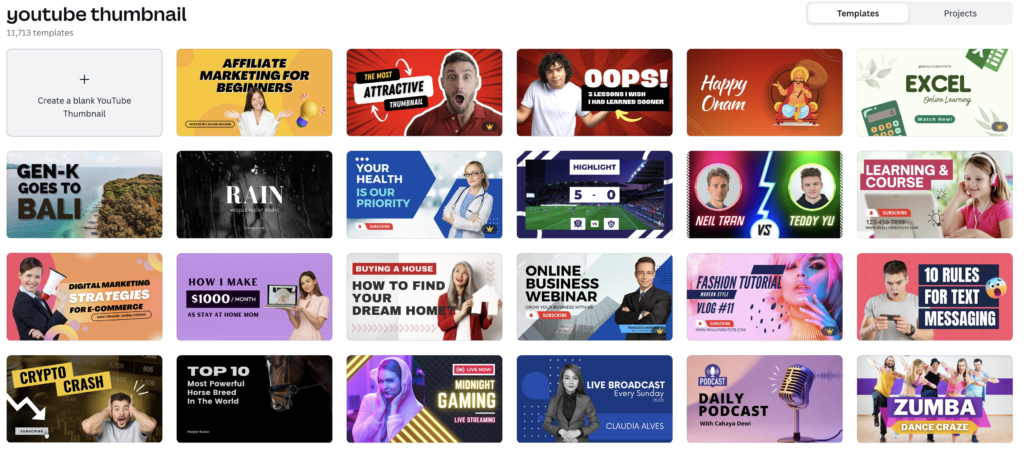
Canva Pro: Offers YouTube thumbnail templates with drag-and-drop editing—perfect for non-designers. Learn more about creating custom graphics.
Adobe Express: Another template-based option with professional design elements.
Photoshop: For advanced users who want complete creative control.
Snapseed or Photopea: Free alternatives with solid editing capabilities.
A/B Testing Thumbnails
YouTube allows you to change thumbnails after publishing. Monitor performance and test variations:
- Try different main images
- Test various text overlays
- Experiment with color schemes
- Compare with and without faces
Give each thumbnail 1-2 weeks before switching to accurately gauge performance.
Updating Old Video Thumbnails
Don’t forget about your back catalog. Outdated or underperforming thumbnails can be refreshed to give old videos new life. This is especially valuable for evergreen content that continues attracting search traffic.
Understanding the 2025 YouTube Algorithm
YouTube’s algorithm has evolved significantly. Understanding how it works in 2025 helps you create content that gets discovered and recommended.
The AI-Driven Personalization Revolution
YouTube’s algorithm now uses advanced AI to personalize recommendations for each viewer. Instead of just looking at popular videos, it considers:
- Individual viewing history and patterns
- Watch time and engagement on similar content
- Viewer demographics and interests
- Time of day and viewing context
- Content freshness and relevance
What This Means for Small Channels: You don’t need millions of subscribers to get views. If your content resonates with a specific audience segment, YouTube’s AI will find and recommend it to viewers most likely to engage—even if your channel is brand new.
Audience Retention is Everything
The algorithm prioritizes videos that keep viewers watching. Key metrics YouTube monitors:
Average View Duration: How long viewers watch on average. A 10-minute video with 5-minute average view duration signals strong content.
Audience Retention Graph: Shows where viewers drop off. If 70% make it through your video, you’re doing well. If most leave in the first 30 seconds, you need a stronger hook.
Rewatch Rate: When viewers rewatch sections or the entire video, YouTube interprets this as highly valuable content.
The Critical First 30 Seconds
Hook viewers immediately. Your video’s first 30 seconds determine whether viewers stay or leave. Techniques that work:
- Promise a specific outcome: “By the end of this video, you’ll know exactly how to…”
- Create curiosity: “The mistake I’m about to show you costs businesses thousands in lost traffic…”
- Show the payoff: Flash to results or key moments from later in the video
- Jump straight into value: Skip long intros—get to the point fast
How YouTube Prioritizes Content
Discovery Sources:
YouTube Search: When viewers actively search, YouTube prioritizes titles, descriptions, and tags matching the query. Relevance beats popularity here.
Suggested Videos: After watching a video, YouTube suggests related content. Getting into suggested videos alongside popular content in your niche drives massive views.
Home Feed: Personalized recommendations based on viewing history. YouTube tests your videos with small audiences first; if engagement is high, it expands reach.
YouTube Shorts Shelf: Short-form content gets separate visibility, often introducing viewers to your channel before they explore long-form content.
The Evergreen Content Advantage
One of YouTube’s most powerful features: properly optimized videos continue attracting views indefinitely. Unlike social media where posts die within days, YouTube videos can gain momentum months or years after publishing.
Why This Matters: Your effort compounds over time. Each video you publish continues working for your business, attracting viewers and potential customers while you sleep.
Videos on timeless topics (how-tos, tutorials, educational content) have incredible long-term value. Even videos on trending topics can resurface when that topic becomes relevant again.
Algorithm Updates to Watch
YouTube regularly tweaks its algorithm. Recent priorities include:
- Satisfaction signals: Click-through rate relative to impressions
- Session time: How long viewers stay on YouTube after watching your video
- Diversification: Showing viewers content from new creators
- Quality over quantity: Better to publish one great video than multiple mediocre ones
Stay updated on SEO trends that apply across platforms, including YouTube.
Engagement Strategies That Work
YouTube’s algorithm interprets engagement (likes, comments, shares) as quality signals. More importantly, engagement builds community and loyalty around your brand.
Encouraging Comments Strategically
Comments boost your video’s ranking and provide valuable feedback. Increase comments by:
Asking Direct Questions: End videos with specific questions viewers can answer. “What’s your biggest YouTube SEO challenge? Let me know in the comments.”
Creating Discussion Prompts: Pose controversial (but appropriate) statements or ask viewers to choose between options.
Responding to Every Comment: Especially in the first 24 hours. This encourages more people to comment and signals to YouTube that your content sparks conversation.
Pinning Engaging Comments: Pin the most insightful or funny comment to encourage others to add their thoughts.
Building Community Connection
Community Posts: Use YouTube’s Community tab (available at 500 subscribers) to share polls, images, and updates between videos. This keeps your audience engaged when you’re not posting videos.
Live Q&A Sessions: YouTube Live allows real-time interaction. Host regular sessions answering viewer questions, discussing topics in-depth, or showing behind-the-scenes content. Learn more about using video for business.
Subscriber Shout-Outs: Acknowledge loyal viewers in your videos. Recognition builds emotional investment in your channel.
End Screen Elements: Use end screens to promote other videos, encourage subscriptions, and link to playlists. This keeps viewers watching your content longer.
Calls-to-Action That Convert
Don’t be shy about asking for engagement, but be strategic:
Pattern Interrupt: Ask for likes/comments at natural break points in your video, not just at the end when viewers might already be gone.
Value-First Approach: Give value before asking. “If you found this helpful, hit the like button” works better than opening with “Don’t forget to like and subscribe!”
Specific CTAs: Instead of generic “subscribe,” try “Subscribe for weekly content marketing tutorials” (specific value proposition).
Leveraging Playlists for Watch Time
Organize videos into themed playlists that automatically play sequentially. This dramatically increases session watch time—a key ranking factor.
Strategic Playlist Creation:
- Group related tutorials together
- Create “Getting Started” playlists for beginners
- Organize by topic or skill level
- Include compelling playlist descriptions with keywords
YouTube Shorts for Business Discovery
YouTube Shorts (vertical videos under 60 seconds) represent a massive opportunity for business discovery in 2025. The algorithm treats Shorts differently from regular videos, often giving them significantly more reach.
Why Shorts Matter for Business
Lower Barrier to Entry: Shorts require less production time and equipment than long-form content, making it easier to post consistently.
Explosive Discovery Potential: Shorts can reach millions of viewers, even from brand-new channels. YouTube heavily promotes Shorts to grow this format.
Top-of-Funnel Strategy: Use Shorts to introduce your business to new audiences, then funnel interested viewers to your long-form content where you can provide deeper value and convert viewers to customers.
Algorithm Advantage: Shorts don’t compete with long-form videos in the algorithm. You can post both without cannibalizing performance.
Creating Effective Business Shorts
Content Ideas That Work:
- Quick tips (30-second actionable advice)
- Before/after demonstrations
- Common mistake warnings
- Tool or resource recommendations
- Myth-busting or surprising facts
- Behind-the-scenes glimpses
- Client testimonials or success stories
Technical Specifications:
- 9:16 aspect ratio (vertical)
- Under 60 seconds
- Add #Shorts to the title or description
- Use trending audio when relevant (but prioritize original content)
Hook Formula for Shorts: First 1-3 seconds must stop the scroll:
- Bold text overlay with intriguing statement
- Pattern interrupt (unexpected visual)
- Direct question to viewer
- Shocking statistic
Funneling Shorts Traffic to Long-Form
The goal isn’t just Shorts views—it’s converting those viewers into loyal subscribers and customers.
In-Video CTAs: “Watch my full tutorial on [topic] – link in my bio” or “Subscribe for the complete guide to [topic].”
Pin Comments: Pin a comment with a link to the related long-form video.
End Screen Suggestion: While Shorts don’t have traditional end screens, you can mention a related video by name at the end, prompting viewers to check your channel.
Series Approach: Create multiple Shorts on the same topic, each teasing different aspects. Curious viewers will seek out your long-form content for the full picture.
Shorts vs. Long-Form: Finding Balance
Don’t abandon long-form content for Shorts. The ideal strategy combines both:
- 2-3 Shorts per week for discovery and algorithm activity
- 1-2 long-form videos per week for depth and conversion
Shorts attract attention; long-form videos build authority and convert viewers into customers.
Analytics and Continuous Improvement
YouTube Analytics reveals exactly how viewers find and interact with your content. Understanding these metrics helps you refine your strategy for better results.
Key Metrics to Track
Impressions and Click-Through Rate (CTR)
- Impressions: How many times YouTube showed your thumbnail
- CTR: Percentage of impressions that became views
- Goal: 4-10% CTR (varies by niche and video age)
Low CTR? Your thumbnail or title isn’t compelling enough. Test improvements.
Average View Duration and Retention
- Average View Duration: Total watch time divided by views
- Audience Retention: Percentage of video viewers watched
- Goal: 40-60% retention for most videos
Identify drop-off points in your retention graph. Did your intro drag on too long? Did a particular section lose people? Use this data to improve future videos.
Traffic Sources Shows how viewers found your videos:
- YouTube Search: Validates your keyword targeting
- Suggested Videos: Indicates your content complements popular videos
- External: Traffic from your website, social media, or email
- Browse Features: Home feed and subscription recommendations
Double down on your strongest traffic sources.
Engagement Metrics
- Likes, comments, and shares relative to views
- Subscriber growth rate
- Card click-through rates
- End screen performance
Real-Time Analytics Monitor the first 24-48 hours after publishing. Early engagement significantly impacts long-term performance. If a video underperforms initially, consider updating the thumbnail or promoting it more actively.
A/B Testing and Optimization
YouTube allows changes after publishing—take advantage:
Thumbnail Testing: Replace underperforming thumbnails after 1-2 weeks if CTR is low.
Title Refinement: Small tweaks to titles can improve CTR without losing ranking. Test different emotional hooks or keyword variations.
Description Updates: Add links, timestamps, or additional context as you learn what viewers need.
Pinned Comment Updates: Change your pinned comment to promote newer, related videos.
Using Data for Content Planning
Analytics reveals what content resonates:
- Which topics get the most views?
- Which videos have the highest retention?
- What keywords drive the most search traffic?
- Which videos convert viewers to subscribers?
Create more of what works. If tutorial-style videos consistently outperform other content, focus your efforts there.
Competitor Analysis Through Analytics
While you can’t see competitors’ full analytics, you can observe:
- Their most popular videos (sort by “Most Popular” on their channel)
- Upload frequency and timing
- Thumbnail and title styles that work in your niche
- Content gaps you could fill
Tools like VidIQ and TubeBuddy provide additional competitive intelligence.
Setting Realistic Goals
Track your progress with specific, measurable goals:
- Month 1-3: Publish consistently, learn the basics, target 100-500 views per video
- Month 4-6: Optimize based on data, target 1,000-5,000 views per video
- Month 7-12: Scale successful content types, target 10,000+ views per video
Adjust goals based on your niche and resources. B2B channels typically have smaller audiences but higher-value viewers than entertainment channels.
For more insight into using data effectively, see our guide on using data to improve blog content—many principles apply to video content as well.
Your 90-Day YouTube SEO Action Plan
Ready to implement everything you’ve learned? Follow this structured plan to launch and grow your business YouTube channel.
Month 1: Foundation and First Videos
Week 1: Channel Setup
- Create/optimize your YouTube channel
- Write compelling About section with keywords
- Add channel keywords in settings
- Design profile picture and banner
- Create social media links
- Develop your content strategy
Week 2: Keyword Research and Content Planning
- Conduct keyword research for 20-30 video ideas
- Create content calendar for first quarter
- Write video scripts or outlines for first 5 videos
- Design thumbnail templates
Week 3: Production and Optimization
- Record and edit your first 3 videos
- Optimize titles, descriptions, and tags for each
- Create custom thumbnails
- Schedule uploads
Week 4: Publishing and Promotion
- Publish first video
- Share across your social media, website, and email list
- Respond to all comments
- Analyze early performance data
Goal: Publish 3-4 optimized videos by end of month
Month 2: Consistency and Optimization
Week 5-6: Content Production
- Maintain weekly upload schedule (minimum)
- Test different video formats (tutorials, Q&As, behind-the-scenes)
- Create 2-3 Shorts to drive discovery
- Start building a content library
Week 7: Data Analysis
- Review analytics for first videos
- Identify best-performing content
- Analyze audience retention graphs
- Adjust future content based on data
Week 8: SEO Refinement
- Update thumbnails on underperforming videos
- Refine titles and descriptions based on search terms report
- Add chapters to existing videos
- Create playlists to organize content
Goal: 6-8 total videos published, initial data insights gathered
Month 3: Scaling and Engagement
Week 9-10: Community Building
- Host first YouTube Live Q&A or tutorial
- Respond to every comment within 24 hours
- Create Community posts (if eligible)
- Reach out to complementary channels for collaboration opportunities
Week 11: Content Expansion
- Publish longer-form, in-depth content (15-20+ minutes)
- Create a “Getting Started” playlist for new viewers
- Develop a Shorts series funneling to long-form content
- Consider repurposing blog content into videos
Week 12: Review and Plan
- Comprehensive analytics review
- Calculate averages: views per video, CTR, retention, subscriber growth
- Identify top 3 performing videos—create similar content
- Plan next quarter’s content strategy
- Set goals for Month 4-6
Goal: 10-12 total videos, consistent posting rhythm established, initial community engagement
Beyond 90 Days: Continuous Growth
Months 4-6:
- Double down on content formats that work
- Optimize upload schedule based on when your audience is most active
- Experiment with different video lengths
- Build strategic relationships with other creators
- Consider paid promotion for top-performing videos
Months 7-12:
- Aim for 50-100+ videos published
- Develop signature series or regular shows
- Create advanced content for loyal viewers
- Explore monetization options (ads, sponsorships, products)
- Build YouTube into a consistent traffic and lead source
Final Thoughts: The Long Game of YouTube SEO
YouTube success doesn’t happen overnight. It’s a long-term investment that compounds over time. Every video you publish continues working for your business indefinitely, attracting viewers and potential customers.
The businesses that win on YouTube are those that:
- Stay consistent with publishing schedules
- Focus on audience value over vanity metrics
- Optimize strategically based on data, not guesses
- Adapt quickly to what works and what doesn’t
- Play the long game with patience and persistence
The 2025 algorithm gives small businesses unprecedented opportunity. With AI-driven personalization, your content can reach exactly the right viewers—even if you’re just starting out.
Your next step is simple: start. Pick one video topic from your keyword research, create it, optimize it following this guide, and publish it. Then create the next one. And the next.
The perfect time to start your YouTube journey was yesterday. The second-best time is today.
Ready to Accelerate Your Digital Marketing?
YouTube is just one piece of your digital marketing puzzle. If you’re looking for expert help with content strategy, SEO optimization, or social media management, Skylark Virtual Services combines proven marketing expertise with cutting-edge AI tools to help businesses like yours grow faster.
Whether you need help launching your YouTube channel, optimizing existing content, or developing a comprehensive digital marketing strategy, we’re here to help. Contact us today to learn how we can accelerate your online growth.
Related Resources: