How to Measure Instagram Hashtags and Make Smart Decisions
I sometimes use affiliate links in content. This doesn’t cost you anything but I may make a commission payment from anything you buy through these links. As an Amazon Associate I earn from qualifying purchases. All opinions remain my own.
Twitter may have invented the hashtag in its modern form but there’s no doubting that Instagram has made the idea it’s own. Without hashtags, Instagram really wouldn’t work so well. But that also means you need to use them if you want to get eyes on your content.
So how do you choose Instagram hashtags? There’s common sense and using words that apply to your caption but there are pitfalls to that, phrases that have become ‘shadowbanned’ or outright banned. This means that you really want to measure Instagram hashtags to make smart decisions.
Table of Contents
Why hashtags matter
It is true that you can post to Instagram with no hashtags in sight. While you do have to have an image to create a post, you don’t have to have hashtags. However, studies show that there are definitely benefits to using them – a post with a single hashtag will get around 12% more engagement than one without.
Hashtags work to categorise and organise content on the platform to make it easier for people to see more stuff they like. Below is an example from Meera Kothand who is brilliant for all things email marketing and making money from your blog. So she uses hashtags including #blogfulltime #workfromhome and #entrepreneur as well as things like #onlinemarketing and #digitalmarketing.
By using hashtags that are a mixture of common sense and more specialist, you can get in front of a larger audience and gain more followers. But you do want to be strategic about choosing them and that means understanding and tracking hashtags.
Hashtag types on Instagram
Before you start adding or tracking hashtags, it is a good idea to get to grips with the different types of hashtags out there.
Community and industry-specific hashtags
According to Social Sprout, these can be the kinds of hashtags that really speak the language of your audience. The aim here is to find ones that are being used but aren’t so popular that your content gets drowned in the flood of people using it. A simple example could be using #femaleentrepreneur rather than just #entrepreneur if you aim for that specific audience.
Branded hashtags
Having your own hashtag or even more than one is something you definitely want to do. It allows you to create a stream of content that is just yours alone but also to connect with user-generated content that also uses it and reshare this. For me, for example, a simple branded hashtag would be #skylarkvirtualservices
Campaign hashtags
These are very specific and often short-lived but help if you are doing sponsored content, have a sale or promotion running or are involved in promoting one. They are also popular for Instagram Stories and other short term content.
General hashtags
General hashtags are a little less specific but some of them can still be used to help spread your reach. Holiday hashtags are a good example ranging from the big ones to those fun social media holidays like #nationalmojitoday – assuming they are relevant for your content! Some of the most popular hashtags can also work well used in the right way. A few examples include:
- #photooftheday – use for your best photos and there’s an account that shares their ‘winner’ to their audience
- #TBT – throwback Thursday is ideal for any nostalgia type posts, looking back at your past or something you want to share with your audience from earlier in your business
- #wisdomwednesday – this is great for quotes
- #regram – this shows you are reposting someone else’s content

Organising your hashtags
There’s no right or wrong way to organise your hashtags but you do want to have a system that lets you keep track of which you have used, and which ones are working.
A simple spreadsheet is a great idea where you can have the hashtag, category and number of posts. Then you could add another sheet noting which hashtags you used, and which perform best. As well as using something like Google Sheets for this, you could also use Airtable, which is somewhere between a database and spreadsheet app.
If you are using a scheduling tool like Later, you may also find that you can save captions with sets of hashtags in and reuse them. This can combine with your spreadsheet for research to get the best results.
Measure Instagram hashtags to pick the best
Using popular hashtags might seem the best approach when you are creating your captions but when you use really general hashtags like #business or #dog then you get sucked into the chaos of millions of posts.
Instead, it is great to have some smaller, more niche hashtags that will resonate with your audience and is the kind of term they are searching for. But where can you find them?
- Look at your audience – when your followers post on your topic, what hashtags do they use?
- Look at competitors – you don’t want to copy but you may find a couple of shared hashtags to use
- Look at industry leaders – again, no copying but find a few that overlap with your business and use them
Research on Instagram
You can easily add any hashtag to Instagram in the search bar and see what comes up. For example, here I used the really general #blogging to see what comes up. Of the list, #blogginglife and #bloggingcommunity could be quite good, depending on what content comes up for them if I was writing a post about being a blogger or offering some tips.
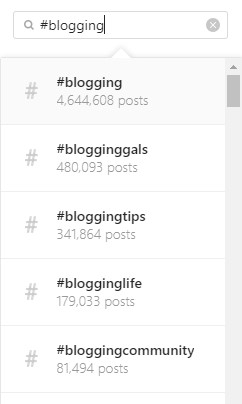
You can also look at the hashtag and see what other hashtags people are using alongside it. Not all of these will be relevant and there are no numbers with them but if you think it might work for your post, you can do the search check again and look at the numbers.
There’s also a ‘related’ feature on Instagram that offers hashtag suggestions based on what you have searched for. Again, grab the hashtag and run it through search to get some numbers.
Research on tools
There are also tools that help you research hashtags and how popular they are. Tailwind may be best known for Pinterest but they also offer Instagram scheduling and have a very handy feature that suggests hashtags and also grades them so you can easily spot a good mixture.
Look for relevant trends
Using trending hashtags can be a great way to get involved with a conversation but always ensure they are relevant to your content and business. For example, don’t use a hashtag about dolphins with a picture of your home office – unless you have dolphin décor or office supplies!
Hashtag tips and tricks
Once you start hashtag tracking Instagram will start to make a little more sense. By gauging the Instagram hashtag popularity as opposed to how it is doing on Twitter or Pinterest, you will see the best hashtags for your captions. But there are a few more tips and tricks to help you get the best hashtags too.
1. Never use irrelevant hashtags
We touched on this before and it is worth mentioning again – don’t use irrelevant hashtags. The reason is simple – people will just use that ‘don’t show for this hashtag’ option on your caption and this can affect your whole account, making it seem like a spam account. Stick with the stuff that is relevant and on-topic.
2. Find the sweet spot in numbers
There’s no firm number to use in your captions – you can use up to 30 but this isn’t always needed. Currently, Hootsuite has research that says 9 hashtags is the best number for engagement with 10-15 being good but less than 7 not so great. However, track this for your own account as every account is different.
3. Have a good balance
One of the reasons I keep away from Instagram at the moment is that there is a lot of work involved with finding the right balance of hashtags and it isn’t a big focus for me currently. But if you want to work on your presence there, you definitely need a blend of general and specific hashtags with a few trending ones thrown in there.
4. Double-check hashtag meaning
What something means to you isn’t what it means to others. So it is worth checking a hashtag and see what it is associated with to ensure you don’t end up with something naughty or weird associated with your brand.
5. Ask your audience to use specific hashtags
Whether it is a branded hashtag, a campaign or just a particular niche hashtag you want to use, there’s nothing wrong with asking people to use it in your comments or even in graphics you create. It is also a great way to find user-generated content to reshare.
6. Try adding captions to the first comment
Another big trend currently is to put the hashtags in the first comment rather than at the end of the caption. In fact, Tailwind recently added an option to have this done automatically. The best thing to do is like everything about Instagram hashtag performance – track and measure. Note which ones have the comment hashtags and see if your Instagram analytics shows them performing better or worse than those with it in the caption itself.
Varying hashtags
As you build up a database of top Instagram hashtags for your account, you might find you use a lot of similar ones. But it is good practice to vary them and not use the same ones in every single post. By adding some new hashtags or swapping them around, you can reach new people and gain new followers. Just always follow the tips above when selecting them.