What is a Social Media Audit? (And How Do You Do One?)
I sometimes use affiliate links in content. This doesn’t cost you anything but I may make a commission payment from anything you buy through these links. As an Amazon Associate I earn from qualifying purchases. All opinions remain my own.
With millions of people using it every day, social media has become a huge part of our lives. And that means it is a huge part of promoting our businesses. You need to be where your audience is whether that is Facebook, Instagram, Twitter, LinkedIn or any of the others. As of 2023, there are approximately 4.9 billion social media users worldwide, a number expected to rise to about 5.85 billion by 2027.
But there’s more to social media marketing than just posting cute videos and funny memes. You need to have a strategy and you also need to conduct a regular audit to make sure everything is harmonious and working properly.
Let’s dive into the social media audit – what it is, how to create one and what to include in it.
Table of Contents
What is a social media audit?
Mention ‘audit’ and your eyes probably glaze over with thoughts of tax and income reports or some boring process that took place at your former job. And yes, an audit may not be the most exciting job on the calendar. But a social media audit can be a bit more interesting than most and is also very important for your marketing strategy.
A social media audit is:
‘a process of reviewing what’s working, what’s failing and what can be improved upon across your social media channels’
Sprout Social
You can use a template, create your own spreadsheet and enlist various tools to help you gather the information you need. And once you have a process in place, you will find future audits are quicker and less painful.
Why carry out an audit?
As a busy business owner, you are probably wondering if you really need another job on your to-do list. I get it but there are solid reasons to carry out an audit of your social media profiles.
Users spend an average of 2 hours and 23 minutes daily on social media platforms. And where people spend their time is also changing. This means you need to be aware of where you audience is.
Platform Popularity:
- Facebook: Maintains the largest user base with over 3 billion monthly active users.
- YouTube: Follows closely with 2.5 billion monthly active users.
- Instagram: Has 2 billion monthly active users.
- TikTok: Experiencing rapid growth, with a 100% user increase between 2020 and 2022.
For example, you could be putting loads of work into X (Twitter), building a big following but not realise that you get very little traffic from it. That might mean a change in strategy is better. Or maybe you have a Facebook group that outperforms a Page and you can concentrate more of your time there.

You might even run into old profiles that don’t represent your brand properly but could put people off if they were searching. Then you can update them or delete them if that’s the better option.
Identify High-Performing Content Types
A social media audit can reveal which content formats resonate most with your audience. Whether it’s images, infographics, carousels, or videos, understanding what drives engagement allows you to refine your strategy.
Recent data shows that short-form videos continue to be the most engaging type of content, with 66% of consumers finding them highly captivating. By leveraging this insight, you can prioritize creating reels, TikToks, or other short videos to maximize audience interaction and growth.
Stay Ahead with Current Trends and Data
Social media is constantly changing, with platforms updating their algorithms, user preferences shifting, and new trends emerging. Incorporating recent data and insights into your social media audit ensures your strategy aligns with what works right now, not what worked last year. For instance, understanding the rise of short-form video content like Reels and TikToks, or the growing emphasis on authenticity in posts, can help you craft content that resonates with your audience.
Staying informed about platform-specific updates is also key. Instagram’s push for video, LinkedIn’s new analytics tools, or X’s (formerly Twitter) subscription-based features can significantly impact your performance if not considered. By integrating these trends into your audit, you can identify opportunities to optimize your strategy and outperform competitors who may be slower to adapt.
Creating an audit template
The first place to start is with an audit template. This is a fancy name for a spreadsheet that contains the information you need and will let you easily compare data in the future. There’s no set things you need to incorporate but some recommended items include:
- Basic account information such as name and URL
- Engagement metrics provided by the site including followers, likes, shares and other information
- Audience demographic information from the site
- Referral traffic information
- Any channel-specific metrics
For many of these figures, the idea is to have an ongoing track of what happens so you can either have a column for each month, quarter or year depending on how frequently you want to conduct your audit. It is always good to compare like to like – so compare Q1 2019 to Q1 2018 for the best view of what’s working.
Summary tab
A good tip from Sprout Social is to have a summary tab on the spreadsheet where you cover all the basic information about the accounts. Then have a separate sheet for each social media account. This means you can set columns for specific data for different sites – retweets for Twitter and shares for Facebook for example.
Step 1 – Find your accounts
Armed with your social media audit template, you are ready to dive into gather the data and see what’s what. The first job is to find all of the social media profiles you have and add that data to the first tab of your template.
Sure, there’s the big ones like Facebook and Instagram. But don’t forget smaller, less well-known ones. There are a few tools you can use to check out existing profiles – Namechk is one example and is also a good chance to spot any places you could start a new profile later.
Once you have the data together, you can decide on which accounts will be your main focus and these are the ones that you move on with the audit for.
Step 2 – Analyse your accounts
Now you have the details of the accounts you want to audit; you can start gathering the basic data. Each tab on your sheet will cover a different social profile and you can record the relevant statistics there.
Don’t worry about recording too much information – it is better to have too much than not enough. You might decide later than some of the stuff isn’t worth tracking and that’s no problem. But for now, just include as much info as possible.
Step 3 – Look at top performing content
Top performing content is always good to study because it shows what has been the most successful. Some of the platforms will show you this while other times you might want to use a tool to look at the information.
For example, I use SmarterQueue to schedule social media and they have options to show you top performing content by a number of different metrics. So this makes it easy to include these on the audit sheet and to look at trends. Trends might be:
- Style of the post – image, text only, video, GIF etc
- When it was posted
- What kind of CTA (call to action) was used if any?
You can even go further and look at the top performing for each type of posts such as promotional, blog post, informational or educational, entertainment and rich media like images or GIFs as well as any video content.
Check BuzzSumo
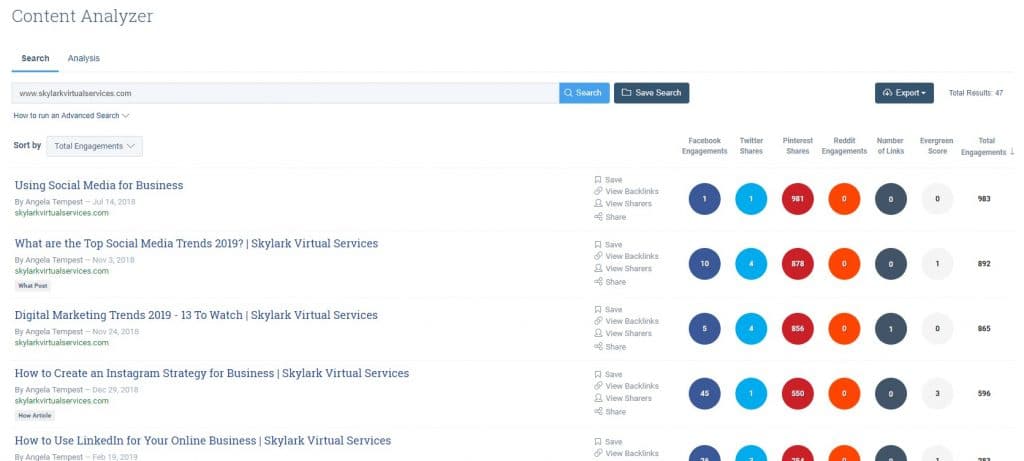
You can also check the most shared content from your website with a tool like BuzzSumo. This is a paid service, but they do offer some information for free. If you add your website, it will give you the top five most shared posts and which networks they were shared on. If you want to go more specific, you can upgrade.
Consult Google Analytics
I’m going to presume you have Google Analytics set up on your website because it is free and gives tons of data. And it is also a good place to find out about the most popular content from your site by the different social media platforms.
Under the Acquisition tab, you will be able to get lots of data on the different ways people come to your site. For example, in Network Referrals you can see your top referrers (social media sites usually) and then go into each one to see which post is sending traffic. With platforms like Pinterest (which isn’t social media, but I would include it in your audit anyway) you can even see which individual pin is sending what traffic.
Step 4 – Make sure branding is okay
Now the social media audit moves beyond just data collection into the realm of making certain things are harmonious and presenting a coherent message for visitors. Because while people don’t often go from one social media site to another, they can, and you want them to recognise you.
There are a few elements to check:
- Bio – does your bio have the same core information and keywords in it? Is it clear what you do and why the person would want to check you out?
- URL in bio – where possible, do you have a URL in the bio? This might be your main website, a chosen landing page for a freebie or even a dedicated landing page (like for Instagram)
- Style guidelines – does the style of your accounts match? Do you use the same or similar images, is your profile picture of you or your logo the same on all profiles?
It can also be worth checking profiles from both desktop and mobile as many sites look a little different between the two. Some include more or less information; layouts are different or even extra details added. Plus most people will be mobile so always best to check on the smaller screen.
Step 5 – Check your audience demographics
The final step is to check some audience demographics. You probably have an idea of who you want to target with your content – for example, I target online small business owners and bloggers and have a speciality in those using or wanting to use Pinterest. I’m not particularly location specific but my audience mostly from the US, UK and Canada as well as other English-speaking countries.
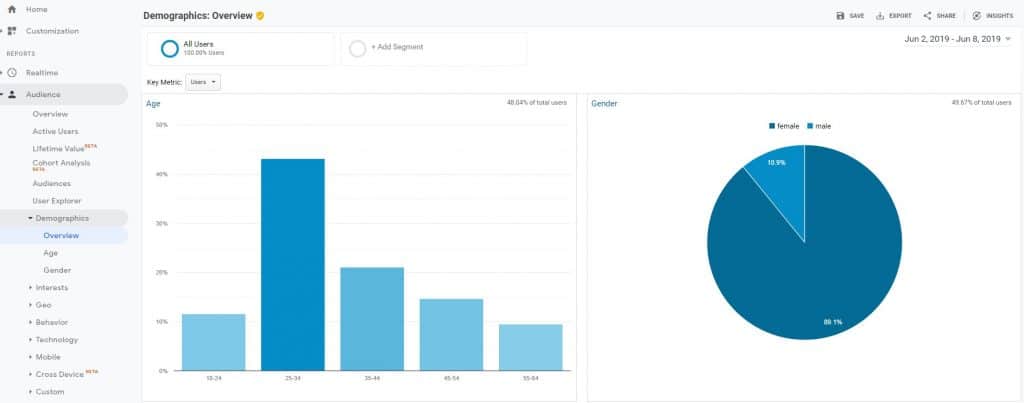
On your sheets, include the demographic information from each profile and see how they compare. You can even use Google Analytics to create a master demographics profile for your primary tab.
Best Practices for Conducting a Social Media Audit
To maximize the impact of your social media audit, consider implementing these best practices that go beyond the basics:
- Define Clear Objectives
Before starting your audit, outline specific goals you want to achieve. Are you focusing on increasing engagement, improving brand consistency, or identifying underperforming content? Clear objectives help direct your audit and ensure actionable results. - Analyze Competitor Strategies
Include a competitor analysis as part of your audit. Identify what your competitors are doing well, where they fall short, and how you can differentiate your approach. Tools like SEMrush or BuzzSumo can provide insights into their content performance and audience engagement. - Evaluate Content Formats
Assess the performance of different content formats—images, videos, carousels, stories, or live streams—to determine what resonates most with your audience. Use these insights to refine your content strategy and prioritize high-performing formats. - Review Posting Schedules
Look at the timing and frequency of your posts. Identify peak engagement times for each platform and adjust your schedule to maximize reach and interaction. Tools like Sprout Social and Buffer can help analyze and optimize your posting patterns. - Check for Accessibility
Ensure your social media content is accessible to all users. Add alt text to images, use captions for videos, and maintain a readable color contrast in your visuals. Accessibility not only widens your reach but also aligns with inclusive practices. - Assess Paid Campaigns
If you’re running paid ads, include an analysis of their performance in your audit. Evaluate metrics like click-through rates (CTR), cost-per-click (CPC), and return on investment (ROI). Identify opportunities to refine your targeting or messaging for better results. - Focus on Audience Insights
Dive deeper into your audience demographics and behaviors on each platform. Identify shifts in your audience’s interests or composition and adjust your content to stay relevant. Most platforms, like Instagram Insights or LinkedIn Analytics, offer detailed audience data. - Track Emerging Trends
Stay informed about new trends and features on each platform. For example, the adoption of AI-driven chatbots on social media or the rise of micro-influencers may present new opportunities to connect with your audience. - Document and Revisit Findings
Create a report summarizing your audit findings and action points. Share this with your team and revisit it periodically to measure progress and adapt to ongoing changes in social media dynamics. - Leverage UGC (User-Generated Content)
Include an analysis of user-generated content (UGC) and its effectiveness. Encouraging followers to create and share content around your brand can boost authenticity and engagement. Monitor hashtags, mentions, and reviews for potential UGC opportunities.
Implementing these practices will elevate your audit, helping you uncover valuable insights and maintain a competitive edge in your social media strategy.
Create objectives going forward
Gathering information is just one part of the process – now you want to look at using it and making decisions about your future efforts based on what you find out.
New platforms
You may decide that some of your platforms aren’t working and you want to try something new. I’ve tried with Twitter but for the amount of traffic I get, it isn’t the best use of my time. But I’ve started to build a decent following on LinkedIn and that does send a little traffic as well as building my credibility on the site. So I’ve swapped focus from Twitter to LinkedIn.
What could you switch focus from? Use the data to make decisions.
Look at your ROI
I’m the first to admit this one is difficult for me. My main income is from my services and there’s not always a direct track from social media to blog to customer to track how the return on investment for social works. But it is worth considering, especially if you sell products or can track your ROI – what does it cost you to use social media versus the return you make?
Create your new objectives
You don’t need to rewrite your goals every time you do a social media audit, but it can be a good idea to check them over and see if adjustments need to be made or new objectives created. For example, maybe you decide to switch focus from Instagram to Pinterest – maybe a new goal is to your old, personal Pinterest account a makeover and start using it for business.
Finishing your social media audit
There’s definitely a bit of satisfaction when you finish your social media audit and have a clear plan for where you want to go next. Finding the right system and schedule for you is important and also using the data – don’t just collect it and leave it in Google Drive unactioned!
Have you done a social media audit? Tell us in the comments how it went or why you have avoided doing it and let’s help each other out!